

We have all been there: joining an important meeting only to spend the first five minutes figuring out why no one can hear us, or why we can’t hear them. To combat this, Microsoft is rolling out a new Test mic and speaker feature in Microsoft Teams, designed to help you verify your audio setup before you ever enter the virtual room.
Why This Feature Was Developed
Audio complications remain one of the most frequent pain points in online collaboration. Microsoft developed this pre-join experience to directly reduce in-meeting troubleshooting and minimize the frustrating “one-way audio” scenarios that derail productivity. By catching device configuration issues early, this feature is designed to boost user confidence ahead of a call—especially for individuals with complex hardware setups or those using new devices.
How to Use It
Validating your audio takes just a few seconds and is built directly into the workflow you already use to join meetings.
- Enter the Pre-Join Screen: Select a meeting to join as you normally would.
- Launch the Test: On the pre-join screen, look under the Computer audio section and click on Test mic and speaker.
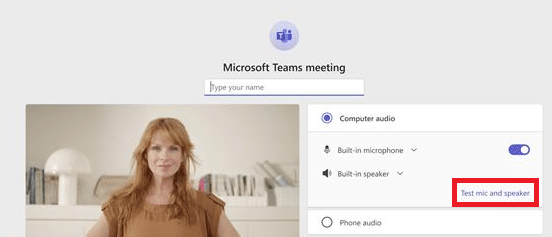
- Follow the Prompts: The guided flow will run two quick checks:
- Speaker Test: Plays an audio tone to confirm that sound is properly coming through your selected output device.
- Microphone Test: Records a short audio sample and plays it back to you, verifying that your input is being captured clearly.
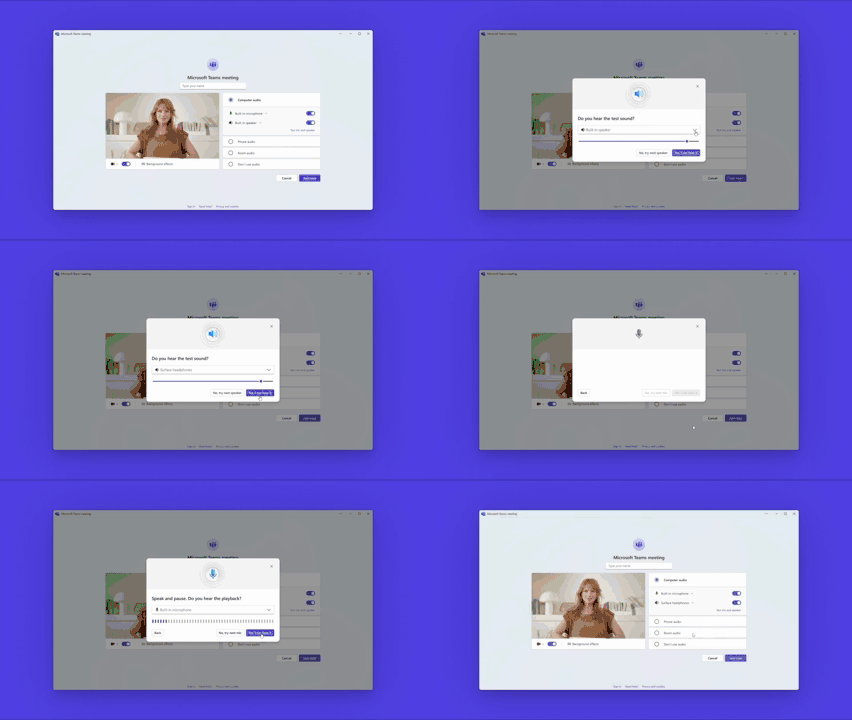
- Review the Summary: A final summary view will confirm whether both of your devices are functioning correctly, giving you the green light to join the call.
Availability and Where to Find It
The Test mic and speaker feature is currently rolling out to Microsoft Teams users across desktop experiences. Microsoft has indicated that additional platform support will follow in the future, so keep an eye out for updates if you primarily use Teams on mobile or the web.
Images courtesy of Microsoft.