

Sometimes hitting the close button on an app in Windows doesn’t close the app entirely. It may stick around as a background process. Or it may be completely frozen and the close button won’t do anything at all. The solution would be to end the program entirely, usually through task manager (which can be opened a multitude of ways). But sometimes it’s a bit overwhelming to find the right thing to kill in task manager.
However, wouldn’t it be easier if you could just right-click on a buggered-up program on your task bar and just say “End Task”? That feature is available in Windows, but it’s hidden by default. Here’s how you enable it.
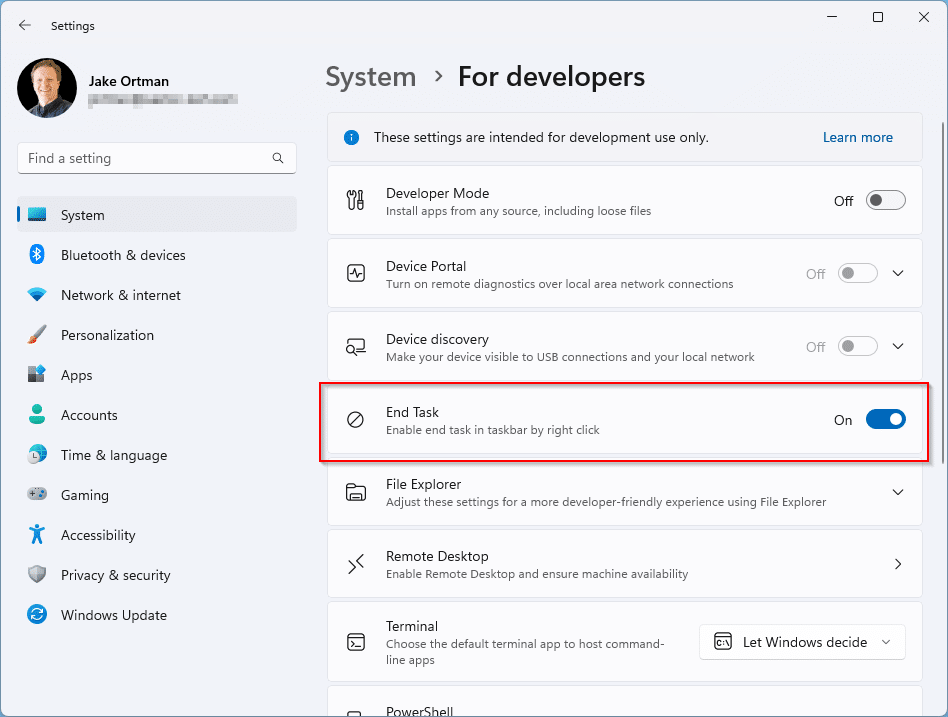
To enable the “End Task” option in the Windows 11 taskbar, navigate to Settings > System > For Developers. You generally don’t want to mess with any of the other settings in there, but you should toggle on the “End Task” setting:
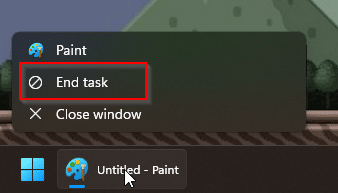
Now when you right-click on apps in the task bar, you’ll see an “End task” option:
This should make killing those stubborn apps much easier.