

If you’re a client of ours that we’ve setup the WestonBlock Email Encryption add-on, you may have noticed a bit of change to how encrypted emails are being processed. This change should make it easier for your receivers to access your encrypted emails.
Previously, when you sent an email to a recipient that you were encrypting with the WestonBlock Email Encryption (usually using something like the [encrypt] tag or one of the automatic rules that encrypts certain types of email), the receiver would receive a link that directed them to a website that they would have to register for to view their encrypted email. It was a bit of a process for some people and not the easiest way to get at your encrypted email.
Proofpoint, the company behind WestonBlock, has changed it so that you just need an access code to get access to the encrypted email. So your recipient will get an email that looks like this:
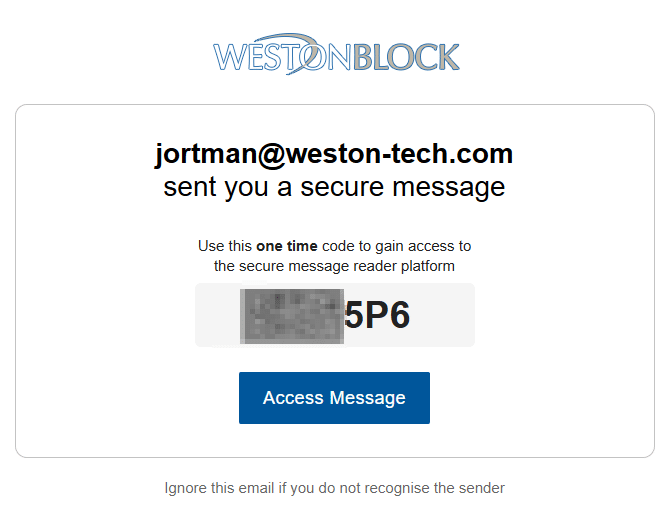
You’ll have a six digit number in that email (obscured in the screenshot above). Click on the “Access Message” link and then input the code from your email:
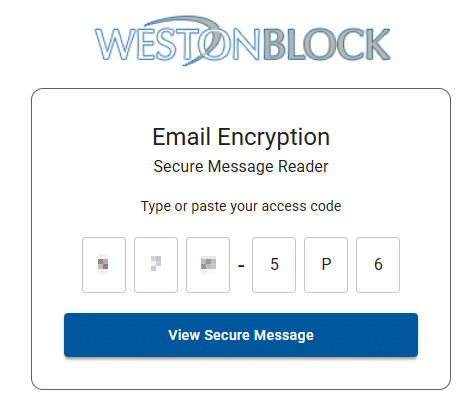
Once you click through that, you can see your secure message, without having to setup an account or register.
Interested in having us setup WestonBlock or even Office365-based email encryption for sending sensitive information to clients? Ping us and we’ll discuss options.