

 The animated GIF is one of the Internet’s oldest technologies, and it’s getting a resurgence with memes on various social media sites and collection/search sites like GIPHY and Gfycat (with GIPHY being used for the GIF search in Microsoft Teams). While there are online tools you can use to create your own animated GIFs, you can now use a tool you’re familiar with: PowerPoint (via Office 365) can now export to GIF. It’s basic functionality, but it’s there.
First, create a slide show that you want to turn into a GIF. In my case, I’m going to create an animated GIF of our staff. So I put everybody’s mug shot onto each slide, with our fearless leader’s mug front and center:

After you’ve created your masterpiece, head to File > Export > Create an Animated GIF. In this menu, you can adjust the size/quality of your GIF, and set the seconds spent on each slide, etc…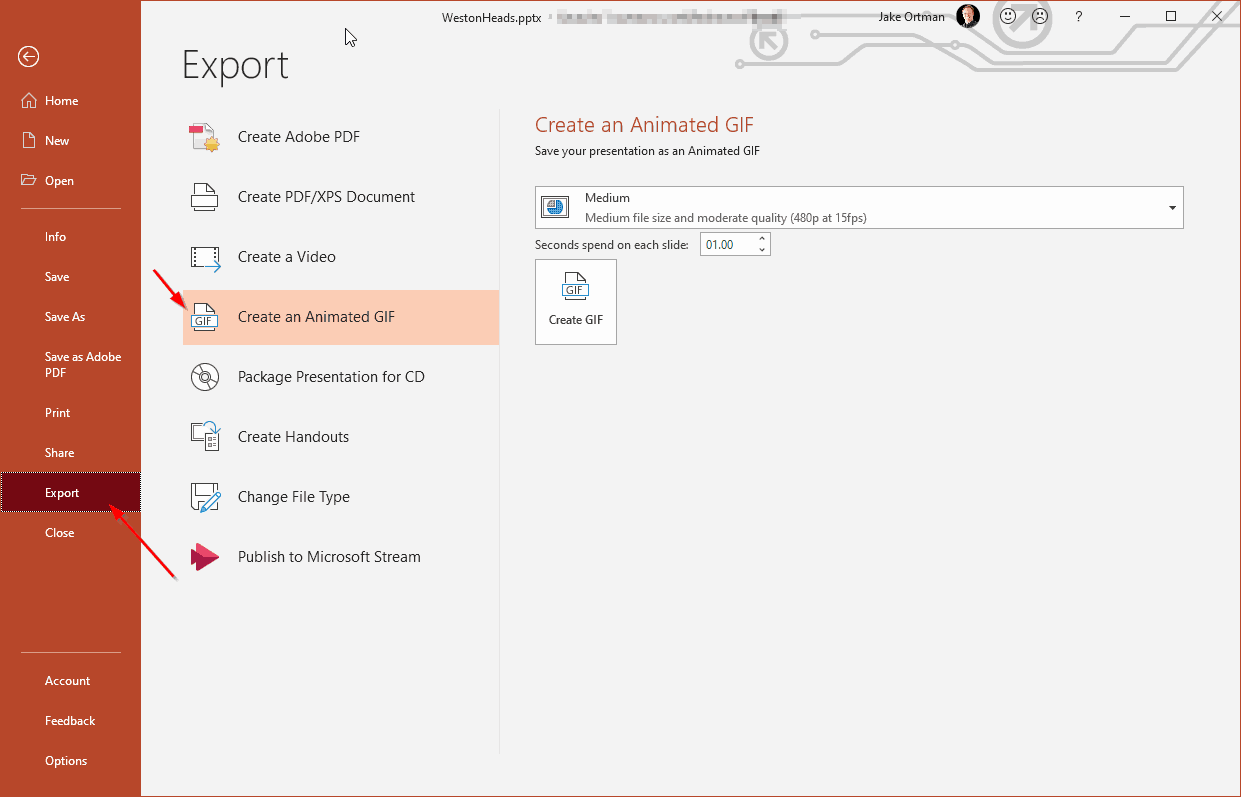
And then you have this masterpiece:

While it’s not as powerful or as fancy as some of the tools out there, it gets the job done in a pinch.
A few notes:
- This feature requires an Office 365 subscription and will not be available on Office 2019 or 2016 (yet another reason we recommend Office 365)
- Web version is coming soon.
- If you don’t want to include a specific slide in your GIF, you either need to remove it or hide it (thanks Office Watch for the tip).