

We are always looking to improve products and services so that we can serve you better, quicker, and more securely. We are migrating our clients to a new Remote Monitoring and Management (RMM) tool to allow for better support and management of your systems. From a user perspective, the tool will run in the background just like our current tool does, allowing us to patch, maintain, and remotely access your machines, just like we do now.
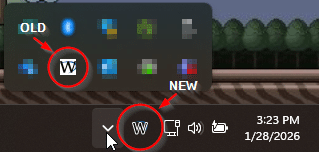
There will also be a few visual changes. Like your “W” icon on your task bar will look slightly different, especially on darker taskbars and system trays (it will look closer to the original on lighter-colored system trays):
In addition, when we connect to your system remotely, the bar across the top that says we are connecting is gone and things will look slightly different now. You’ll see a little bar with our technician’s name and the company we work for instead of just our abbreviated name:

You’ll then be able to easily compare it to our Team page to make sure it’s one of us on your computer.
The transition will be mostly transparent to you, as we’ll install the new RMM agent in the background using our current RMM tool. Once we verify that the new RMM agent is installed, we’ll use it to uninstall the old one.
If you have any questions about this transition at all, let us know.